On this page
- Key takeaways
- What is the difference between AI training and AI grounding?
- How do you set Bing's new AI preferences?
- What happens to NOARCHIVE and NOCACHE?
- How do Microsoft, OpenAI and Google compare?
- Why grounding matters for visibility: our data
- Which setting should you choose?
- Common mistakes
- Where Citeroot fits
- Frequently asked questions
- Does opting out of AI training affect my Bing rankings?
- What is the default if I do nothing?
- Can I block grounding for my whole site in robots.txt?
- What does disallowextended mean?
- Next step
- Sources
Bing now treats AI training and AI grounding as separate choices. Training means using your content to change a model; grounding means using it to inform AI answers such as Copilot's. To stay citable while opting out of training, disallow ai-training and leave ai-grounding allowed. Both default to allow, and normal Bing rankings are unaffected.
By Nadir Ali, founder of Citeroot. Updated 22 November 2026. Microsoft's own announcement is the main source; OpenAI's and Google's crawler documentation are cited for comparison.
#Key takeaways
- Microsoft announced on 30 October 2026 that Bing will read separate preferences for AI training and AI grounding. Both default to allow, and Microsoft says they do not change eligibility for traditional Bing search results.
- To opt out of training site-wide, add a robots.txt group for
__usage_ai-trainingwithDisallow: /; page-levelai-training:disallowalso works. - Grounding is set page by page only, with
ai-grounding:disallow, orai-grounding:disallowextendedto allow Microsoft's own AI experiences but not third-party grounding services. - NOARCHIVE and NOCACHE, Bing's old AI signals, stop being read as training or grounding preferences after 1 March 2027. Sites that use them should publish the new preferences before then.
- Grounding is how most AI answers find sources: in 4,527 answers Citeroot collected on four other AI platforms, 88% cited at least one source. Blocking grounding removes you from that pool on Microsoft's side.
#What is the difference between AI training and AI grounding?
AI training and AI grounding are two different uses of your content. Microsoft's announcement defines training as using content to change the learned parameters of a generative AI model, and grounding as using content as input to help inform AI-generated responses.
In practice, training shapes what a model knows in general, months later, with no link back to you. Grounding happens when an answer is written: the AI reads current pages and can cite them, as Copilot does when it links its sources. For most businesses, grounding is where visibility comes from, so blocking it costs more than blocking training.
#How do you set Bing's new AI preferences?
Bing's preferences use robots.txt for site-wide training choices and page-level tags for grounding. Microsoft says it begins honouring them as it crawls pages from 1 February 2027.
| Goal | Setting | Where |
|---|---|---|
| Opt the whole site out of AI training | User-Agent: __usage_ai-training followed by Disallow: / | robots.txt |
| Opt one section out of AI training | User-Agent: __usage_ai-training followed by Disallow: /example-path/ | robots.txt |
| Opt one page out of AI training | <meta name="Bingbot" content="ai-training:disallow"> or the header X-Robots-Tag: Bingbot: ai-training:disallow | Page or HTTP header |
| Keep a page out of AI answers | ai-grounding:disallow | Page meta tag or HTTP header |
| Allow Microsoft's own AI answers but not third-party grounding services | ai-grounding:disallowextended | Page meta tag or HTTP header |
| Stay in AI answers and training | Nothing; both default to allow | None |
There is no site-wide robots.txt setting for grounding, so a grounding opt-out has to be applied to each page, usually through a template or a header rule. Test the tags on a few pages before rolling them out.
#What happens to NOARCHIVE and NOCACHE?
NOARCHIVE and NOCACHE are being retired as AI signals. Since 2023 Bing has read them as AI controls: in its September 2023 announcement, NOARCHIVE kept content out of Bing Chat answers and training, and NOCACHE limited answers to the URL, title and snippet.
Microsoft's new announcement sets out the changeover:
- 15 December 2026: sites that use NOARCHIVE or NOCACHE can record a temporary grounding preference in Bing Webmaster Tools.
- 1 February 2027: Bing begins honouring the new preferences as it crawls pages.
- 1 March 2027: NOARCHIVE and NOCACHE are no longer read as training or grounding preferences, and the deadline to publish new preferences and record a temporary one.
- 30 September 2027: temporary grounding preferences expire.
Microsoft adds that there is no temporary setting for training, so a site that relied on NOARCHIVE to keep out of training needs the new __usage_ai-training rule before 1 March 2027.
#How do Microsoft, OpenAI and Google compare?
Each company now offers a way to opt out of training while staying in AI answers, but the controls differ.
| Company | Opt out of training | Stay in AI answers | Catch |
|---|---|---|---|
| Microsoft (Bing, Copilot) | __usage_ai-training in robots.txt, or ai-training:disallow | Leave ai-grounding allowed | Grounding is set page by page |
| OpenAI (ChatGPT) | Block GPTBot in robots.txt | Allow OAI-SearchBot | Blocking OAI-SearchBot removes you from ChatGPT search answers |
| Google (Gemini, Search) | Block Google-Extended in robots.txt | Search features use Googlebot, which Google-Extended does not affect | Google-Extended also stops grounding in Gemini Apps |
OpenAI's crawler overview treats GPTBot, its training crawler, and OAI-SearchBot, its search crawler, as separate settings, and says sites that block OAI-SearchBot "will not be shown in ChatGPT search answers". Google's crawler documentation, as reported by Search Engine Journal, says Google-Extended controls use for training Gemini models and for grounding in Gemini Apps, and does not affect inclusion or ranking in Google Search.
#Why grounding matters for visibility: our data
Grounding is how AI answers find the pages they cite, and most answers cite something. Citeroot does not track Copilot, but it collected 4,527 answers from ChatGPT, Gemini, Google AI Mode and Google AI Overviews in the 90 days to 22 November 2026, across 160 questions in 10 markets.
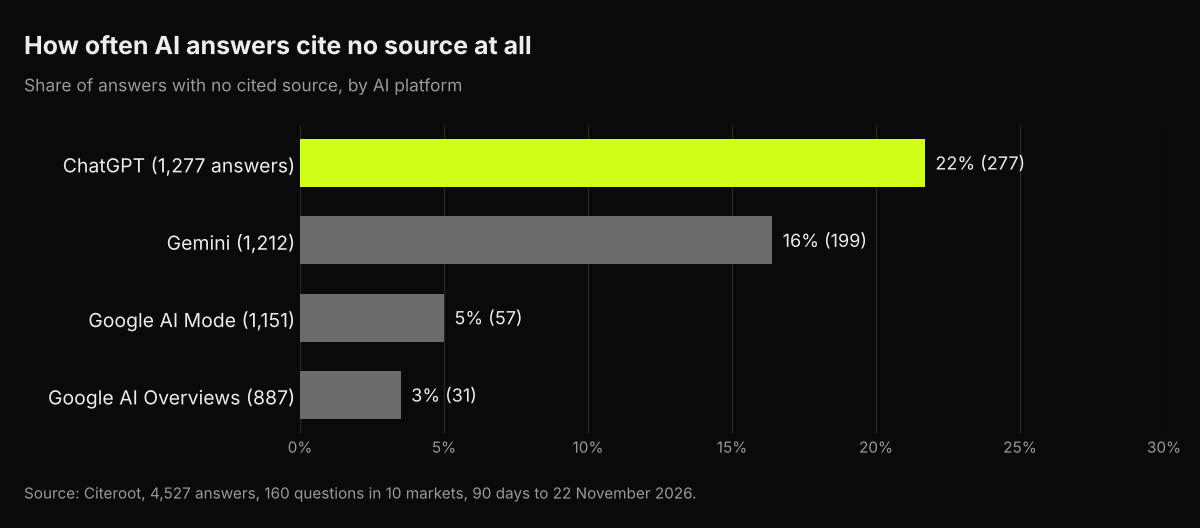
3,963 of the 4,527 answers (88%) cited at least one source, from 78% on ChatGPT to 97% on Google AI Overviews. Each of those citations depended on the platform being allowed to use the page to ground its answer. If you block grounding, you leave that pool; if you block only training, you keep your place in it. To see how often Copilot cites you, use the free AI Performance report in Bing Webmaster Tools.
#Which setting should you choose?
Most businesses that want customers to find them should leave grounding allowed. The choice about training is a matter of policy rather than visibility.
- You want maximum AI visibility: leave both allowed. Do nothing.
- You object to your content training models but want to be cited: add the
__usage_ai-trainingrule and leave grounding allowed. - You sell content, such as a paywalled publication: consider
ai-grounding:disallowextendedorai-grounding:disallowon the pages you sell, and accept the lost citations on those pages. - You used NOARCHIVE or NOCACHE: decide which of the above you meant, publish the new preferences, and record a temporary grounding preference in Bing Webmaster Tools between 15 December 2026 and 1 March 2027.
#Common mistakes
- Blocking grounding when you meant to block training. You lose Copilot citations and keep nothing you wanted.
- Relying on NOARCHIVE after March 2027. It will no longer be read as a training or grounding preference.
- Expecting a site-wide grounding switch. Grounding is page level only; apply it through templates or headers.
- Copying one company's rule to another.
__usage_ai-training, GPTBot and Google-Extended each cover different things. - Forgetting to measure. Check Bing's AI Performance report before and after any change.
#Where Citeroot fits
Citeroot does not track Copilot or Bing's AI answers; it tracks ChatGPT, Gemini, Google AI Overviews and Google AI Mode, and its site audit shows which of 20 AI crawlers your robots.txt admits, including GPTBot, OAI-SearchBot and Google-Extended. Pair it with Bing Webmaster Tools for the Microsoft side. See our free AI crawler checker.
#Frequently asked questions
#Does opting out of AI training affect my Bing rankings?
No. Microsoft says the new preferences do not change eligibility for traditional Bing search results, subject to normal crawl and indexing requirements.
#What is the default if I do nothing?
Both AI training and AI grounding default to allow when no preference is published, so your content stays eligible for both.
#Can I block grounding for my whole site in robots.txt?
No. Microsoft offers a robots.txt setting for training only; grounding preferences are set per page with a meta tag or HTTP header.
#What does disallowextended mean?
ai-grounding:disallowextended lets your content support Microsoft's own AI experiences while excluding third-party services that use Microsoft's grounding.
#Next step
Open your robots.txt today and check for NOARCHIVE or NOCACHE in your page templates. If you use either, decide whether you meant to block training, grounding or both, and publish the new preferences before 1 March 2027. Then compare Bing's AI Performance report before and after.
#Sources
- Microsoft Bing, Your content, your choice: clearer preferences for training and grounding, 30 October 2026.
- Microsoft Bing, Announcing new options for webmasters to control usage of their content in Bing Chat, September 2023.
- Microsoft Bing, Introducing AI Performance in Bing Webmaster Tools Public Preview, February 2026.
- OpenAI, Overview of OpenAI crawlers, read 22 November 2026.
- Roger Montti, Search Engine Journal, Google Updates Gemini/Vertex AI User Agent Documentation, 28 April 2025.
- Citeroot answer data: 4,527 answers on ChatGPT, Gemini, Google AI Mode and Google AI Overviews (90 days to 22 November 2026, 160 questions, 10 markets).