
On this page
- Why the panel matters more than the tool
- How to build a prompt panel, step by step
- 1. Collect real questions
- 2. Cover each buying stage
- 3. Limit branded questions
- 4. Size the panel for decisions
- 5. Let each question build up answers
- 6. Freeze it
- 7. Record the conditions
- Common mistakes
- Frequently asked questions
- How many prompts should I track for AI visibility?
- Should prompts include my brand name?
- How often should I update the panel?
- Where do I find good questions?
- Next step
- Sources
This article is part of our guide: How to measure AI visibility: a 9-step workflow, with a worked example
A prompt panel is the fixed set of buyer questions you ask AI assistants on a schedule to measure visibility. Build it from real customer questions, cover every buying stage, keep at least four in five questions free of your brand name, use 20 to 50 questions, and freeze the list so results stay comparable over time.
The panel decides what your numbers mean. A good tracker on a bad panel produces confident, wrong answers. This guide shows how to build one, with data from Citeroot (citeroot.app) showing what happens when a panel leans on questions that name you.
#Why the panel matters more than the tool
Every AI visibility figure is a share of answers to some set of questions. Change the questions and the figure changes, even if nothing about your brand did. Our own panel shows how far apart the stages can be.
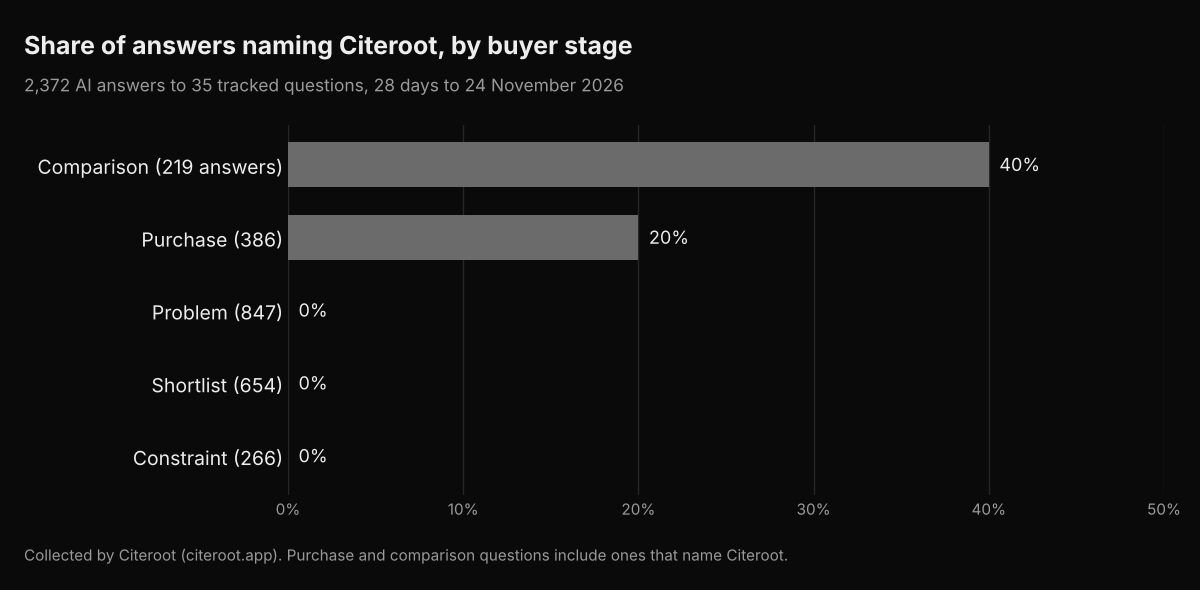
Citeroot was named in 40% of answers to comparison questions and 20% of purchase questions, and in none of the 1,767 answers to problem, shortlist and constraint questions. The comparison and purchase figures come almost entirely from questions that name Citeroot. A panel built mostly from those would report a healthy brand. A panel built from the questions buyers ask before they know us reports the truth: unbranded discovery is zero.
#How to build a prompt panel, step by step
#1. Collect real questions
Start from what buyers actually ask, not from your keyword list. Good sources are sales call notes, support tickets, the "People also ask" boxes in Google, Reddit threads in your market, and the questions in your own site search. Write each one as a person would type it to an assistant: a full question, not a two-word keyword.
#2. Cover each buying stage
Group the questions by where the buyer is. Five stages work for most markets:
| Stage | What the buyer asks | Example |
|---|---|---|
| Problem | How to solve something | "how do I know if chatgpt recommends my business" |
| Shortlist | Which options exist | "best ai visibility tools for small businesses" |
| Constraint | Options that fit a limit | "best AI visibility software for agencies managing many clients" |
| Comparison | One option against another | "Peec AI alternatives" |
| Purchase | Ready to buy | "ai search engine optimization software pricing" |
Problem and shortlist questions are where new buyers meet brands for the first time, so give them the most weight.
#3. Limit branded questions
Keep at least four in five questions free of your brand name. A question that names you is answered from your own pages and almost always names you, so it raises your rate without telling you anything about discovery. A few branded questions are useful for checking how AI describes you; report them separately.
#4. Size the panel for decisions
Aim for 20 to 50 questions. Fewer than 20 swing too much from week to week: Otterly.AI's study of 252,407 answers found brand coverage measured with 10 prompts ranged from 39% to 71%, against 51% to 60% with 100 prompts (Otterly.AI, September 2026). More than 50 is fine if you can afford it, but more questions of the same kind add less than more answers to good questions.
#5. Let each question build up answers
A new question needs time. In our panel, questions added in late November had three or four answers each after a few days, against about 100 for questions tracked all month. Do not judge a question, or a change, until it has dozens of answers on each engine.
#6. Freeze it
Write the list down with the date and do not edit it between reports. If you must add or remove questions, do it at a reporting boundary and say so, because the totals before and after are not comparable. Our article on why your AI visibility score moved shows how a panel change can look like a real result.
#7. Record the conditions
For each answer, keep the engine, date, country and whether the assistant searched the web. The same question asked from two countries can name different brands.
#Common mistakes
- Using keywords instead of questions. "AI visibility tool" is not how anyone talks to an assistant.
- Asking only "best X" questions. Shortlist questions matter, but buyers start earlier, with problems.
- Including competitors' brand names in questions. "Semrush vs Ahrefs" measures those two, not the market.
- Changing the list every week. Each change resets your baseline.
#Frequently asked questions
#How many prompts should I track for AI visibility?
Between 20 and 50 for most businesses, mostly unbranded and spread across buying stages. Smaller panels give results that swing too much to act on.
#Should prompts include my brand name?
A few can, to see how AI describes you, but keep at least four in five unbranded and report the branded ones separately.
#How often should I update the panel?
Review it each quarter, and change it only at a reporting boundary. Add new questions when your market or product changes, not to chase a better number.
#Where do I find good questions?
Sales and support conversations, Google's "People also ask", community threads and your site search. The prompt builder drafts a starting set from your product and buyers.
#Next step
Draft 30 questions with the prompt builder, check that no more than six name you, and run them for four weeks before drawing conclusions. Our guide on how to measure AI visibility covers what to do with the answers.
#Sources
- Otterly.AI, We measured how stable AI citations and brand mentions really are, September 2026.
- Citeroot, 2,372 answers on four AI platforms, US, 28 days to 24 November 2026.