On this page
- Key takeaways
- What does AI visibility mean?
- The five metrics
- A worked example: our own numbers
- How to measure AI visibility in 9 steps
- 1. Choose the scope
- 2. Write the questions
- 3. Fix the conditions
- 4. Collect the answers and keep them whole
- 5. Read and code each answer
- 6. Calculate the rates, with ranges
- 7. Find the cause
- 8. Report it honestly
- 9. Change one thing, then measure again
- A reporting template
- Common mistakes
- Frequently asked questions
- What is a good AI visibility score?
- How many questions do I need to track?
- How often should I measure AI visibility?
- Can I measure AI visibility for free?
- Which AI platforms should I check?
- Next step
- Sources
To measure AI visibility, write a fixed list of questions your buyers ask, put each one to the AI assistants several times, and count how often your brand is named, how often your site is cited and who is named instead. The result is a rate with a range, for one set of questions, on named platforms, in one country, over stated dates.
#Key takeaways
- AI visibility belongs to a set of questions, not to a company. Change the questions and the number changes.
- Track five separate metrics: mention rate, citation rate, recommendation rate, share of voice and accuracy.
- Answers vary from run to run. Ask each question more than once and report a range, not a single figure.
- Keep questions that contain your brand name apart. They always name you and prove nothing about being found.
- A spreadsheet is enough to start. The method below is the same at any size.
#What does AI visibility mean?
AI visibility is how often an AI assistant names, cites or recommends a brand when people ask questions the brand could answer. It is measured on a sample of answers, so every figure is an estimate. Three things are easy to mix up:
- A mention is your brand named in the text of an answer.
- A citation is a link to your own site among the answer's sources.
- A recommendation is the answer saying you are a good choice for what was asked.
An answer can cite your page without naming you, or name you while recommending someone else. Count them apart. Our guide to mentions, citations and recommendations has examples of each.
#The five metrics
| Metric | Formula | What it tells you |
|---|---|---|
| Mention rate | Answers naming the brand ÷ valid answers | Whether you are found at all |
| Citation rate | Answers linking to your site ÷ valid answers | Whether your own pages are used as a source |
| Recommendation rate | Answers recommending the brand ÷ valid answers | Whether being named helps you |
| Share of voice | Your mentions ÷ all tracked brands' mentions | Your size next to chosen rivals |
| Accuracy rate | Answers describing you correctly ÷ answers naming you | Whether what is said is true |
A "valid answer" is one that was collected successfully. A run that failed is not an answer that left you out, so keep failed runs out of the denominator and report how many there were.
#A worked example: our own numbers
We track 28 buyer questions about AI visibility tools for our own product, Citeroot, on ChatGPT, Gemini, Google AI Overviews and Google AI Mode. In the 28 days to 21 November 2026 that produced 2,187 valid answers.
- Mention rate: 184 of 2,187 answers named Citeroot, which is 8%, with a 95% range of 7 to 10%.
- Citation rate: 144 of 2,187 answers linked to citeroot.app, which is 7%.
- Recommendation rate: 101 of 2,187 answers recommended it, which is 5%.
- By stage: every mention came from comparison and purchase questions. On problem and shortlist questions the rate was 0%.
The same answers named Semrush in 1,113 (51%), Profound in 1,016 (46%) and Ahrefs in 866 (40%).
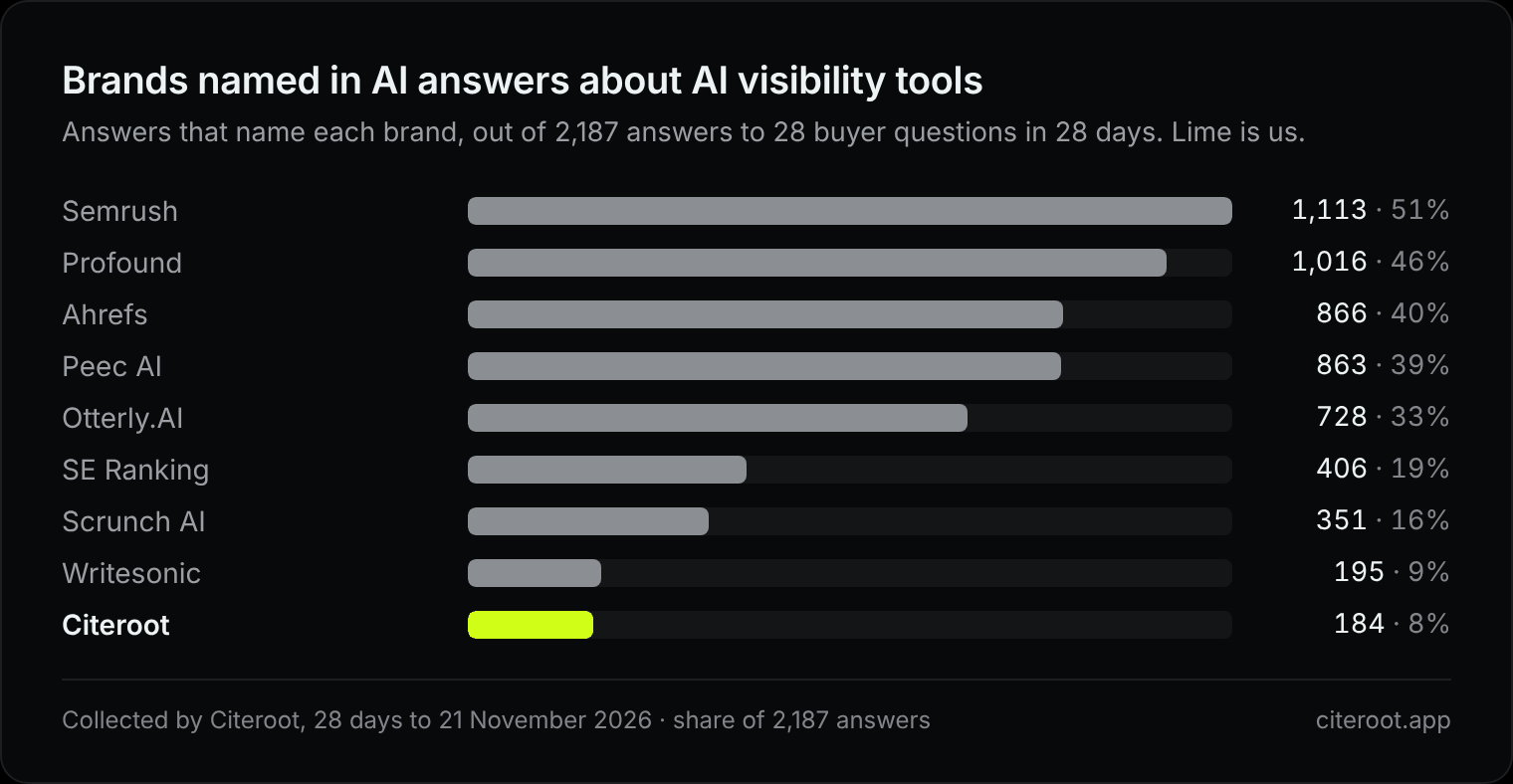
Two lessons from our own figures. The overall 8% hides the fact that we are invisible where buyers start, which only the split by stage shows. And the comparison with the 28 days before (9%) is flat: the ranges overlap, so that one-point move is noise.
#How to measure AI visibility in 9 steps
#1. Choose the scope
Pick one business area: a product line, an audience or a market. A company that sells three things has three visibilities.
#2. Write the questions
Write 20 to 50 questions across the buying journey: the problem, the shortlist, comparisons, constraints such as budget, and the purchase. Use the words from sales calls, support tickets and search data. Our free buyer-prompt builder drafts a first list, and how to build a prompt panel covers the method.
#3. Fix the conditions
Decide and write down the platforms you will check, the country and language, how many times each question is asked in a period, and the dates. Answers collected under different conditions cannot be compared.
#4. Collect the answers and keep them whole
For each run, save the question, the platform, the date, the full answer text and the list of sources. Do not summarise. Mark a failed run as failed.
#5. Read and code each answer
For every valid answer, record whether the brand is named and where in any list, whether your site is cited, whether you are recommended, which rivals are named, and whether what is said about you is right. Two people coding the same sample is the cheapest check on quality.
#6. Calculate the rates, with ranges
Work out the five metrics. For each rate, add a confidence interval so a small sample is not read as a firm result. Our free share-of-voice calculator does both. Here it is with four brands from the example above:
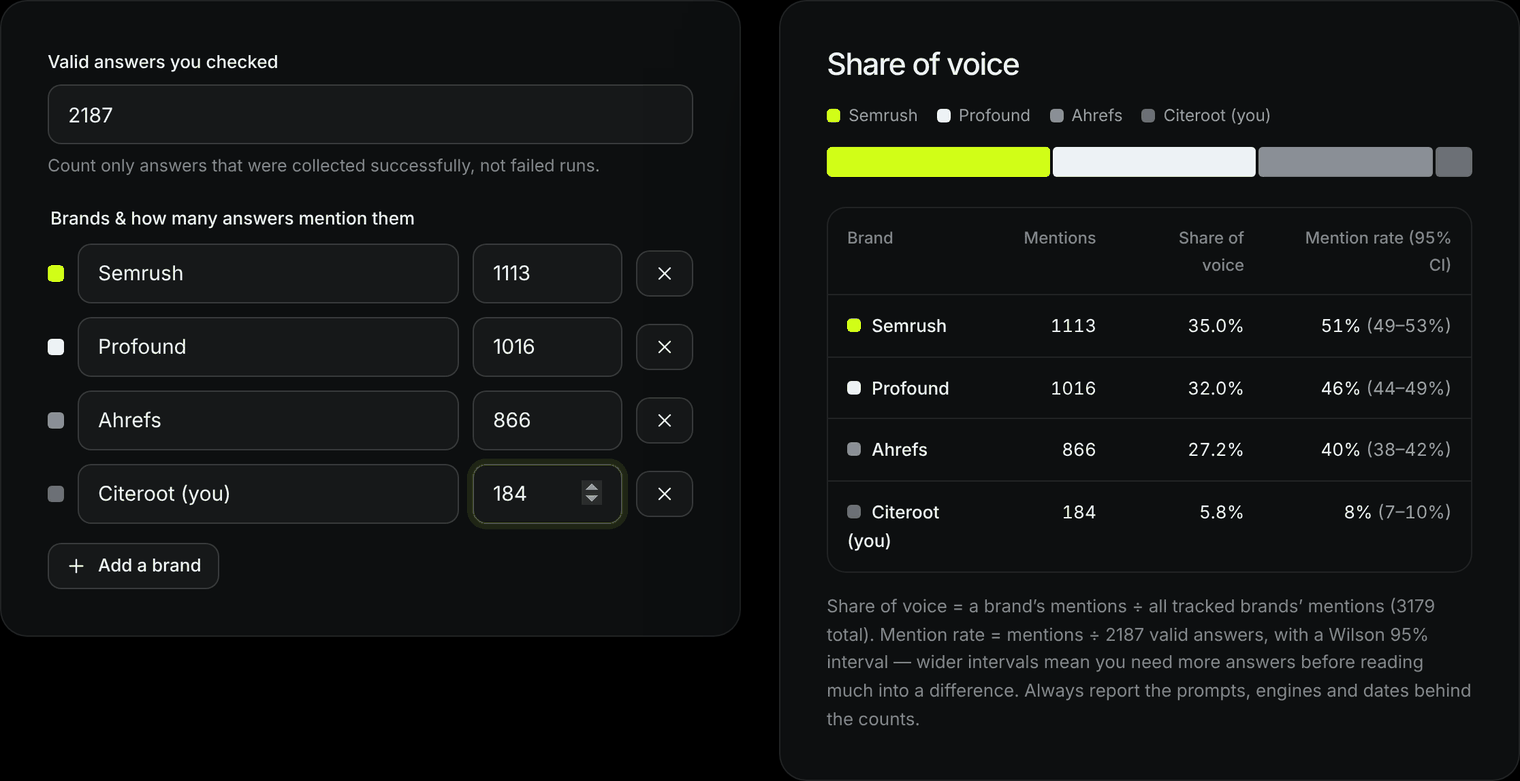
Notice that share of voice (5.8%) and mention rate (8%) are different numbers for the same brand. Share of voice depends on which rivals you include. Share of voice in AI search explains the difference.
#7. Find the cause
Pair the numbers with four checks:
- Access. Can AI crawlers reach your pages? Test it with the AI crawler access checker.
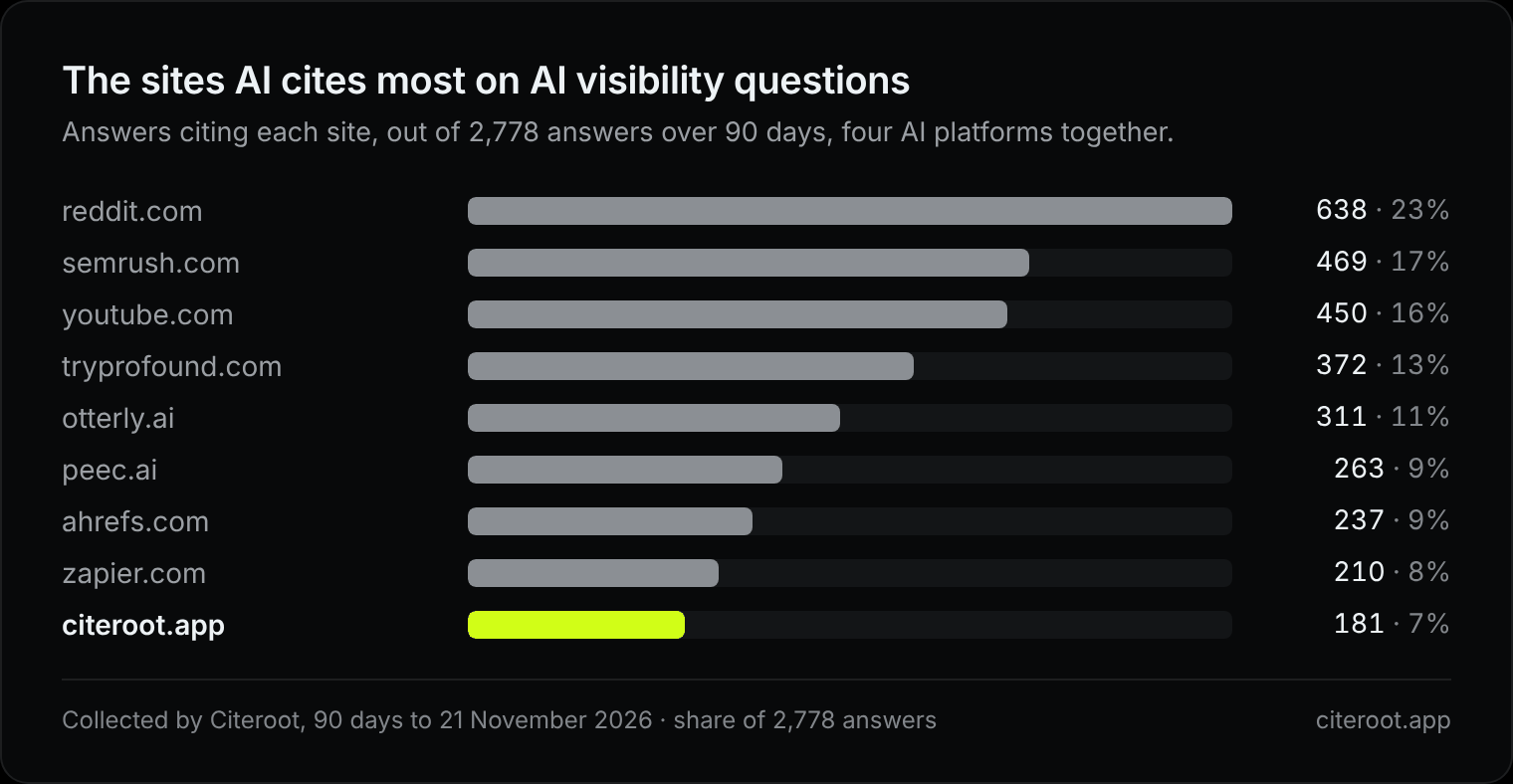
- Sources. Which sites do the answers cite, and which of them never mention you?
- Demand. What do people search for around these questions? Search Console shows it.
- Outcomes. Which visits come from AI assistants, and what do they do? See reading GA4 for AI referrals.
In our case the sources explain the low rate. Across 2,778 answers over 90 days, Reddit was cited in 638 and named us in 25 of those.
#8. Report it honestly
A report people can trust states the questions, platforms, country, language and dates; the valid and failed runs; each metric with its range; three example answers (one good, one bad, one surprising); and what you will change and when you will measure again.
#9. Change one thing, then measure again
Make one bounded change, record the date, and run the same questions under the same conditions. Call the result evidence, not proof. Other things changed in those weeks too.
#A reporting template
Scope: <business area>
Period: <dates>
Questions: <n> (<stages>)
Platforms: <list> · Country and language: <...>
Runs: <valid> valid, <failed> failed
Mention rate: <x>% (range <a to b>%)
Citation rate: <x>%
Recommendation rate: <x>%
Most cited sites: <list>
Gaps: <sites that cite rivals and not us>
Accuracy problems: <list>
Next change: <what, when>#Common mistakes
- One score for everything. A single "AI visibility score" hides which of the five metrics moved.
- Checking once. One answer is one sample. The same question names different brands on different runs.
- Changing the questions each month. A trend needs the same questions. Add new ones as a separate set.
- Counting branded questions. "Is [your brand] good?" names you every time and inflates the rate.
- Reading small differences. If the ranges overlap, you have not measured a change.
- Counting failed runs as absences. A run that returned nothing says nothing about you.
#Frequently asked questions
#What is a good AI visibility score?
There is no universal benchmark, because the number depends on the questions you chose. Compare yourself with the rivals named in the same answers, and with your own earlier figures on the same questions.
#How many questions do I need to track?
Start with 20 to 50. Fewer than that and the ranges are too wide to read. More only helps if someone will act on each question's result.
#How often should I measure AI visibility?
On a fixed schedule: daily or weekly collection, read monthly. Answers change with model updates and with new pages on the web, so a single audit goes stale quickly.
#Can I measure AI visibility for free?
Yes, by hand in a spreadsheet, for a small number of questions. It becomes slow once you ask each question several times on several platforms, which is when a tool earns its cost.
#Which AI platforms should I check?
The ones your buyers use. For most businesses that means ChatGPT, Google's AI Overviews and AI Mode, and Gemini. Check each separately, because the same question gets different answers on each.
#Next step
Write your first five questions and ask them by hand today. To have them asked on a schedule, Citeroot's Free plan checks five questions every week on ChatGPT, Gemini, Google AI Overviews and Google AI Mode, and keeps every answer.
#Sources
- Aggarwal et al., GEO: Generative Engine Optimization, KDD 2024.
- Google Search Central, Optimizing for generative AI features in Search.
- Citeroot's own tracking of 28 questions, 21 November 2026. The counts in this article come from it.