On this page
- Key takeaways
- How does ChatGPT choose local businesses to recommend?
- How to get ChatGPT to recommend your local business, step by step
- 1. Make your listings complete and identical
- 2. Claim your listing in ChatGPT's Business Hub
- 3. Earn reviews where ChatGPT can read them
- 4. Make your website say what, where and for whom
- 5. Get mentioned on local sites
- 6. Let ChatGPT's crawler read your site
- 7. Check from your customers' area
- What does Google's AI cite in local markets? Our data
- What if your business has no website?
- Common mistakes
- Where Citeroot fits
- Frequently asked questions
- Does ChatGPT use Google Business Profile?
- Why does ChatGPT recommend a competitor instead of me?
- Can a business outside the US claim its ChatGPT listing?
- How long does it take for ChatGPT to start recommending my business?
- Next step
- Sources
To get ChatGPT to recommend your local business, keep your listings complete and consistent, starting with Yelp, which licenses business data to OpenAI, claim your business in ChatGPT's Business Hub if your listing is eligible, earn reviews and mentions on local sites people trust, and make your website say plainly what you do, where and for whom.
By Nadir Ali, founder of Citeroot. Updated 22 November 2026. OpenAI's help pages, Google's documentation and news reports are cited where they apply; the data comes from answers Citeroot collected, and each figure says how many answers, which platforms and which dates.
#Key takeaways
- Local answers depend on where the asker is. OpenAI says ChatGPT collects general location information from the user's IP address and may share it with search providers to improve results.
- Yelp is licensing reviews, photos and business information to OpenAI as a source of real-time local recommendation data for ChatGPT, Axios reported in July 2026.
- OpenAI's Business Hub lets a business claim its ChatGPT listing; for now, local stores and restaurants can claim only an existing US listing, and a local mention counts when ChatGPT shows a result for that location.
- If your customers also use Google, its AI Overviews lean on social sites: in Citeroot's data, facebook.com was cited in 26% of AI Overview answers with sources, in all 9 markets tracked.
- A business without a website can still be tracked: Citeroot can start a project from a Google Business Profile link.
#How does ChatGPT choose local businesses to recommend?
ChatGPT builds local recommendations from what it can find about businesses near the asker. OpenAI's help page on ChatGPT search says ChatGPT collects general location information based on the user's IP address and may share it with third-party search providers, so the same question asked in two cities names different businesses.
OpenAI does not publish how it ranks local businesses, but it does say where some of the data comes from. Axios reported on 23 July 2026 that Yelp is licensing reviews, photos and other business information to OpenAI, giving ChatGPT a new source of real-time local recommendation data. Your listings, your reviews and your own website are therefore the three things to get right.
#How to get ChatGPT to recommend your local business, step by step
The steps run from the quickest fixes to the slower work of earning reviews and mentions. None of them involves gaming the system; each makes accurate information about you easier to find.
#1. Make your listings complete and identical
Check every listing that describes you: Yelp, Google Business Profile, Bing Places, Apple's business listings and the directories for your trade. Use exactly the same business name, address, phone number, hours, categories and description everywhere, and fill in services, prices and photos where the listing allows.
#2. Claim your listing in ChatGPT's Business Hub
OpenAI's Business Hub lets a business claim its profile and keep its details current. OpenAI's setup guide says local stores and restaurants can currently claim only an existing US listing, and that for a local business a mention counts when ChatGPT shows a result for that location. Claiming gives no guarantee of more visibility, but it puts your own details on your profile; our guide to claiming your business in ChatGPT covers the steps.
#3. Earn reviews where ChatGPT can read them
Ask happy customers to review you on Yelp and Google, and reply to reviews, good and bad. With Yelp's content licensed to OpenAI, your Yelp reviews are part of what ChatGPT can draw on. Never buy or invent reviews: fake reviews break the platforms' rules and can get a listing penalised.
#4. Make your website say what, where and for whom
Give each service and each area you serve a clear page that opens with a plain answer, such as "We repair boilers in Leeds and Bradford, same day, from £80". List your address, hours and contact details on every page, and answer the questions customers ask on the phone in a short FAQ. Our free AEO page checker shows whether a page opens with a quotable answer.
#5. Get mentioned on local sites
Local news, community sites, your chamber of commerce and "best of" lists for your town are the kinds of page an assistant can cite. Sponsor a local event, offer a useful quote to a local reporter, or ask the author of a local roundup to consider you, with a reason their readers would care.
#6. Let ChatGPT's crawler read your site
OpenAI's crawler overview says sites that block OAI-SearchBot "will not be shown in ChatGPT search answers". Check your robots.txt with our free AI crawler checker, and check that your website builder or security plug-in is not blocking it.
#7. Check from your customers' area
Ask ChatGPT the questions your customers ask, such as "best plumber near me" or "dog groomer in Austin open Sundays", in a fresh chat from your service area or with the town in the question. Note who is recommended and why, then repeat monthly.
#What does Google's AI cite in local markets? Our data
Many local customers search Google as well as ChatGPT, and Google's AI Overviews cite very different sources. Citeroot collected 864 Google AI Overview answers in the 90 days to 22 November 2026, for 143 questions across 9 markets; 833 of them cited at least one source.
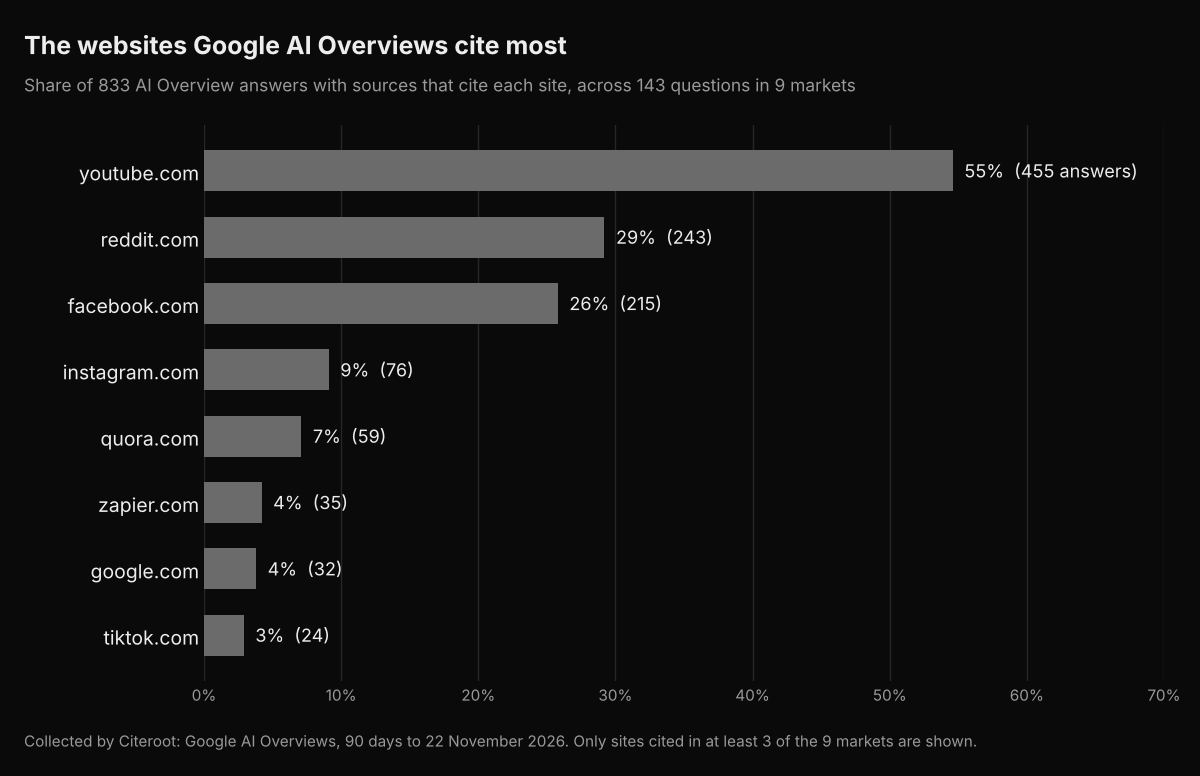
facebook.com was cited in 26% of AI Overview answers with sources and appeared in all 9 markets; instagram.com was cited in 9%, in 8 of them. ChatGPT behaves differently: across 1,000 ChatGPT answers with sources in the same period, social sites took 0.1% of its citations and editorial pages 90.5%. A local business therefore needs both an active, accurate social presence for Google's AI and listings, reviews and local articles for ChatGPT.
#What if your business has no website?
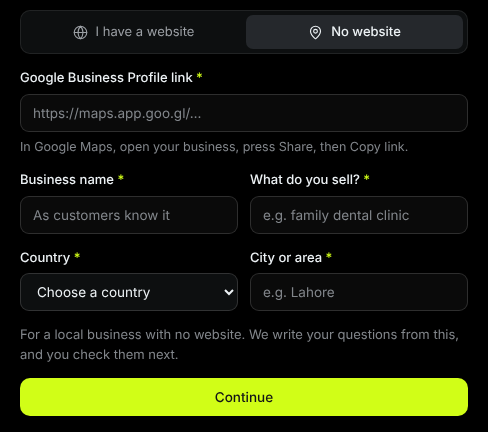
A business without a website can still be found by AI assistants through its listings, reviews and social profiles, and it can still be tracked. Citeroot can start a project from a Google Business Profile link instead of a website: you add the link, your business name, what you sell, your country and your city, and Citeroot writes your first questions.
#Common mistakes
- Letting listings drift apart. Different hours or phone numbers across Yelp, Google and your site give assistants conflicting facts.
- Ignoring Yelp. With Yelp's data licensed to OpenAI, an incomplete or outdated Yelp profile now matters for ChatGPT.
- Checking from the wrong place. ChatGPT uses the asker's general location, so check from your service area.
- Buying reviews. Fake reviews break platform rules and put your listings at risk.
- Expecting Business Hub to rank you. Claiming keeps your details right; it does not guarantee a recommendation.
#Where Citeroot fits
Citeroot asks the questions your local customers ask on ChatGPT, Gemini, Google AI Overviews and Google AI Mode, from your country and city, and stores every answer with the businesses named and the sources cited. A project can be one city, and a business without a website can start from its Google Business Profile. See the Answer Tracker.
#Frequently asked questions
#Does ChatGPT use Google Business Profile?
OpenAI has not said that it does. What has been reported is Yelp's licensing deal with OpenAI, and OpenAI says ChatGPT may use third-party search providers. Keep Google Business Profile accurate anyway, because Google's own AI features and many directories rely on it.
#Why does ChatGPT recommend a competitor instead of me?
Usually because the competitor has more complete listings, more reviews or more mentions on the pages ChatGPT reads. Ask the same question several times, note the sources, and compare their profiles with yours.
#Can a business outside the US claim its ChatGPT listing?
It depends. OpenAI says local stores and restaurants can currently claim only an existing US listing, and availability for other businesses depends on location and type.
#How long does it take for ChatGPT to start recommending my business?
There is no fixed timeline. Listing and website fixes can show up once they are crawled; reviews and local mentions build over months. Check the same questions monthly.
#Next step
Open your Yelp and Google Business Profile listings today and make every detail match your website. Then ask ChatGPT three questions your customers ask, from your service area, and note who it recommends. To have those questions checked every week, start Citeroot's free plan, with your website or your Google Business Profile.
#Sources
- OpenAI, ChatGPT search, read 22 November 2026.
- OpenAI, Setting up your business on ChatGPT, read 22 November 2026.
- OpenAI, Overview of OpenAI crawlers, read 22 November 2026.
- Axios, Exclusive: Yelp partners with ChatGPT to surface reviews, 23 July 2026.
- Citeroot answer data: 864 Google AI Overview answers across 9 markets and 1,277 ChatGPT answers across 10 markets (90 days to 22 November 2026).