On this page
- Key takeaways
- What is Business Hub in ChatGPT?
- Who can claim a business in ChatGPT?
- How to claim your business in ChatGPT, step by step
- 1. Open Business Hub
- 2. Find and select your listing
- 3. Prove you represent the business
- 4. Pass the Persona identity check
- 5. Wait for OpenAI's decision
- 6. Update your business details
- 7. Read your insights
- What do Business Hub insights show?
- Named is not the same as a mention: our data
- Does claiming improve your visibility in ChatGPT?
- Common mistakes
- Where Citeroot fits
- Frequently asked questions
- Does it cost anything to claim a business in ChatGPT?
- What if my business is outside the US?
- Can I see the questions people asked about my business?
- Why are my insights blank?
- Do I need a Business Agent?
- Next step
- Sources
To claim your business in ChatGPT, open Business Hub from the ChatGPT sidebar or chatgpt.com/business-hub, find your business, verify you represent it by phone, email, a DNS record or Shopify, then pass an identity check with Persona. OpenAI reviews each claim. Once approved, you can edit your details and see 28 days of mentions and clicks.
By Nadir Ali, founder of Citeroot. Updated 22 November 2026. OpenAI's own help article is the main source; the example data comes from answers Citeroot collected, and each figure says how many answers, which platform and which dates.
#Key takeaways
- OpenAI launched Businesses in ChatGPT in beta on 10 November 2026. Its Business Hub lets a verified business manage its profile and see insights; claiming is free and needs no ads account.
- You can claim a business if you own it or are authorised to represent it. OpenAI says local stores and restaurants can currently claim only an existing US listing.
- Verification has two parts: proving the link to the business (phone, email, a DNS record or a Shopify connection) and an identity check with Persona.
- Insights cover the past 28 days. For an online business, a mention counts only when ChatGPT references your website; your name alone does not count.
- In our own ChatGPT sample, 52 of 615 answers named Citeroot but only 31 linked to citeroot.app, so at least 21 named us without the reference Business Hub counts.
#What is Business Hub in ChatGPT?
Business Hub is the part of ChatGPT where a business claims its profile, keeps its information current and sees how it appears in ChatGPT. OpenAI introduced it as part of Businesses in ChatGPT, a beta launched on 10 November 2026, alongside Business Agents, which let eligible businesses answer customer questions inside ChatGPT.
OpenAI's help article on setting up your business is clear about what claiming does and does not do: it lets you manage the information you provide, but it gives no guarantee of more visibility and no direct control over ChatGPT's own recommendations. Treat it as getting your facts right, not as a way to rank.
#Who can claim a business in ChatGPT?
Anyone who owns a business or is authorised to represent it can start a claim, but availability depends on the business's location and type. OpenAI says local stores and restaurants can currently claim only an existing US listing, so a local business elsewhere may not find a listing to claim yet.
Business Agents have narrower rules. OpenAI says they are available to eligible ecommerce and online service businesses in the US with a website, and they must meet its Business Agents Policy. You do not need an ads account or a ChatGPT Enterprise agreement to claim a business.
#How to claim your business in ChatGPT, step by step
The claim itself takes a few minutes; OpenAI's review and the identity check add waiting time.
#1. Open Business Hub
Sign in to ChatGPT and open Business Hub from the sidebar, or go to chatgpt.com/business-hub. Use the ChatGPT account that should manage the business, ideally one tied to a company email.
#2. Find and select your listing
Search for your business by name and select the listing that matches. Confirm the ChatGPT account that will manage it.
#3. Prove you represent the business
Choose one of the verification methods OpenAI offers for your listing: a text or automated call to the business phone, a code sent to a business email address, a TXT record added to your website's DNS settings, or a Shopify store connection. The methods available vary by listing, so check that the phone, email or domain on the listing is one you control.
#4. Pass the Persona identity check
OpenAI also requires identity verification through Persona. Until Persona approves you, you cannot publish changes to your business information or view insights.
#5. Wait for OpenAI's decision
OpenAI reviews each claim and emails its decision. Keep the verification details you used, in case it asks for more.
#6. Update your business details
Once approved, check every detail against your website, such as your name, description and contact details, and your products if you run a shop. Correct anything out of date, because these are the details ChatGPT can show to people who open your profile.
#7. Read your insights
Open Insights to see the past 28 days of mentions, website clicks and discovery topics. Note the numbers each month, so you have a baseline before you change anything.
#What do Business Hub insights show?
Business Hub insights show aggregate activity over the past 28 days: mentions, website clicks and discovery topics. The definitions matter more than the numbers.
| Insight | What OpenAI counts | What it does not show |
|---|---|---|
| Mentions, online business | Times ChatGPT references the business's website | Answers that name you without referencing your site |
| Mentions, local business | Times ChatGPT shows a result for that location | The questions people asked |
| Website clicks | Clicks from ChatGPT to your site | Whether those clicks became visits or sales |
| Discovery topics | Themes in conversations where you appeared | Individual prompts or customer intent |
OpenAI says businesses do not receive individual prompts or conversations, and that a blank metric can mean activity has not reached the reporting threshold. Business Hub also shows nothing about competitors or about whether ChatGPT recommended you, so pair it with your own checks.
#Named is not the same as a mention: our data
Business Hub's definition of a mention is narrower than being named. Citeroot tracks its own website on ChatGPT; in the 28 days to 22 November 2026, it collected 615 ChatGPT answers in the US.
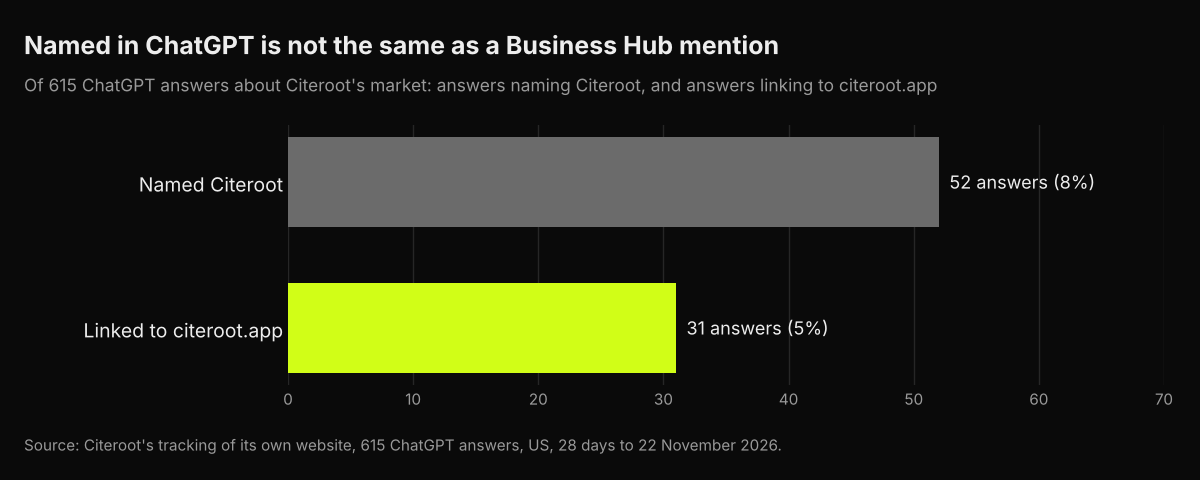
ChatGPT named Citeroot in 52 answers but linked to citeroot.app in 31. Since at most 31 of the naming answers could also have linked, at least 21 named Citeroot without referencing the website, and under OpenAI's definition for an online business those would not count as Business Hub mentions. Business Hub counts what ChatGPT says across all its users, not our sample, but the gap shows why its mention count can run well below how often ChatGPT actually names you.
#Does claiming improve your visibility in ChatGPT?
Not directly. OpenAI says claiming does not guarantee increased visibility or control over ChatGPT's independent recommendations. What claiming does is make sure the details ChatGPT shows about you are the ones you supplied, which matters when old information is circulating.
Visibility comes from the pages ChatGPT reads: your own site and the articles, reviews and lists that mention you. Our guide to improving brand visibility in ChatGPT covers that work, and our guide to getting ChatGPT to recommend a local business covers the local side.
#Common mistakes
- Claiming with a personal account. If that person leaves, the business loses access; use a company account.
- Picking a verification method you cannot complete. Check the listing's phone, email or domain first.
- Leaving old details in place. An approved claim is the time to correct every field.
- Reading mentions as all mentions. For an online business, the Hub counts website references, not every time ChatGPT names you.
- Expecting a ranking boost. OpenAI says claiming does not guarantee more visibility.
#Where Citeroot fits
Citeroot covers what Business Hub leaves out. It asks your buyer questions on ChatGPT, Gemini, Google AI Overviews and Google AI Mode, stores every answer, and records whether you were named, linked and recommended and who was named instead. Use Business Hub for ChatGPT's first-party counts and Citeroot for the answers, the competitors and the other platforms. See the Answer Tracker.
#Frequently asked questions
#Does it cost anything to claim a business in ChatGPT?
OpenAI's help article lists no fee for claiming, and it says you do not need an ads account or a ChatGPT Enterprise agreement.
#What if my business is outside the US?
It depends on your business type and location. OpenAI says local stores and restaurants can currently claim only an existing US listing, and availability varies for other businesses, so search Business Hub for your listing to see what is offered.
#Can I see the questions people asked about my business?
No. OpenAI says businesses do not receive individual prompts or conversations. Discovery topics show broad themes only.
#Why are my insights blank?
A blank metric can mean activity has not reached OpenAI's reporting threshold. Check again after more time has passed.
#Do I need a Business Agent?
No. Claiming and insights work without one. Business Agents are optional and currently limited to eligible US ecommerce and online service businesses with a website.
#Next step
Claim your business in Business Hub this week, correct every detail, and record your first 28 days of insights. Then check what ChatGPT actually says by asking ten buyer questions, or start Citeroot's free plan to have five questions checked every week on four AI platforms.
#Sources
- OpenAI, Setting up your business on ChatGPT, read 22 November 2026.
- Citeroot answer data: 615 ChatGPT answers about Citeroot's own market (US, 28 days to 22 November 2026).