On this page
- Key takeaways
- Why does ChatGPT get facts about a business wrong?
- How to fix wrong information in ChatGPT, step by step
- 1. Record the wrong answer
- 2. Open the sources in the answer
- 3. Fix your own site first
- 4. Fix your profiles and listings
- 5. Ask third parties to correct their pages
- 6. Claim your profile in Business Hub
- 7. Report the answer
- 8. Recheck every month
- How much of ChatGPT can you trace? Our data
- Common mistakes
- Where Citeroot fits
- Frequently asked questions
- Can I ask OpenAI to correct an answer about my business?
- How long does it take for ChatGPT to show the correct information?
- What if ChatGPT confuses my business with another one?
- Does wrong information hurt my visibility?
- Next step
- Sources
When ChatGPT has wrong information about your business, find where it came from, fix it at the source, and give ChatGPT a correct version to find. Open the sources in the answer, correct your own site first, then your profiles and listings such as Google Business Profile and Yelp, claim your Business Hub profile, and recheck monthly.
By Nadir Ali, founder of Citeroot. Updated 22 November 2026. OpenAI's help pages and news reports are cited where they apply; the example comes from answers Citeroot collected about its own business.
#Key takeaways
- Wrong answers usually trace back to a page somewhere: an old page on your own site, a directory or review profile, or what the model learned in training.
- Answers that cite sources can be traced, so open them first. Of 1,277 ChatGPT answers Citeroot collected over 90 days, 22% cited no source at all, and those errors are the slowest to fix.
- It happens to us too. In answers collected on 21 November 2026, ChatGPT said Citeroot's paid plans "start with a 14-day free trial", quoting an older version of our pricing page; the page now offers a 3-day trial of Grow.
- OpenAI's Business Hub lets a verified business manage the information it provides, but OpenAI says that gives no direct control over ChatGPT's own recommendations.
- For local businesses, Yelp is licensing reviews, photos and business information to OpenAI, according to Axios, so a wrong Yelp listing can feed into ChatGPT's answers.
#Why does ChatGPT get facts about a business wrong?
ChatGPT gets business facts wrong for five common reasons, and the fix depends on which one applies.
- An old page is still online. A forgotten pricing page, PDF or blog post says something that is no longer true.
- Sources disagree. Your site says one thing, a directory says another, and ChatGPT repeats one of them.
- A third party made the mistake. A review site, marketplace or article lists the wrong address, owner or product.
- The model learned it in training. When ChatGPT answers without searching, it relies on what it learned, which may be out of date.
- Names get mixed up. A business with a similar name, or a former name, gets blended into yours.
#How to fix wrong information in ChatGPT, step by step
The steps run from finding the source to checking the fix worked. Most corrections take a few hours of work and several weeks to show up.
#1. Record the wrong answer
Save the question, the full answer, the date and a screenshot. Ask the same question two or three more times in fresh chats, because a one-off error matters less than one ChatGPT repeats.
#2. Open the sources in the answer
OpenAI's help page on ChatGPT search says answers that use search include inline citations, with the sources listed alongside. Open each one and search it for the wrong fact. If the answer shows no sources, skip to step 6: the error probably comes from what the model already knew.
#3. Fix your own site first
Search your own site for the old fact, including blog posts, PDFs, FAQs, help pages and page descriptions, and correct or remove every copy. Put the current fact on one clear page, such as your pricing or contact page, with a visible date it was last updated.
#4. Fix your profiles and listings
Update every profile that describes you: Google Business Profile, Yelp, industry directories, review sites, marketplaces and social profiles. This matters more for local businesses since Axios reported in July 2026 that Yelp is licensing reviews, photos and other business information to OpenAI as a source of local recommendation data for ChatGPT.
#5. Ask third parties to correct their pages
When an article or review site has the error, contact the publisher with the correct fact and a link to the page that proves it. Keep the request short and specific; editors fix a clear factual error far more readily than a request to rewrite.
#6. Claim your profile in Business Hub
If ChatGPT lets you claim your business, do it, so the details ChatGPT shows on your profile come from you. OpenAI's setup guide says claiming lets a business manage the information it provides, while giving no guarantee of visibility or control over ChatGPT's independent recommendations. Our guide to claiming your business in ChatGPT walks through it.
#7. Report the answer
Use the feedback buttons on the answer to tell OpenAI it is wrong, and say what the correct fact is. It will not change the answer straight away, but it puts the error on record.
#8. Recheck every month
Ask the same questions each month in fresh chats and note whether the wrong fact still appears. Answers that rely on search can change once the corrected pages are crawled; facts the model learned in training change only when OpenAI updates its models.
#How much of ChatGPT can you trace? Our data
You can only fix an error you can trace, and not every ChatGPT answer shows where it came from. Citeroot collected 4,527 answers from four AI platforms in the 90 days to 22 November 2026, for 160 questions across 10 markets.
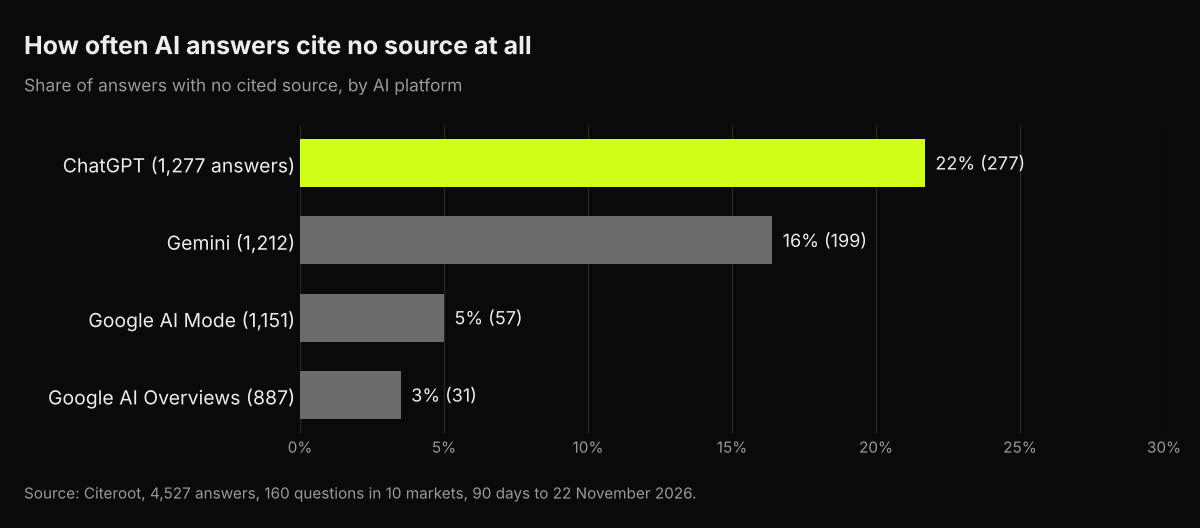
Of the 1,277 ChatGPT answers, 277 (22%) cited no source. A wrong fact in one of those has no page to point to, so the only fix is to make the correct fact consistent and easy to find everywhere, and wait for the model to catch up. The other 78% listed sources you can open and check.
Our own error was the traceable kind. In ChatGPT answers collected on 21 November 2026 for "get started with Citeroot for AI tracking", ChatGPT quoted our pricing page as saying the paid plans "start with a 14-day free trial". The live page offers a 3-day trial of Grow, so ChatGPT was working from an older version of the page; the fix is the same as for any business: keep the page current, make the trial terms unmistakable, and recheck.
#Common mistakes
- Fixing ChatGPT before fixing the source. If the wrong fact is still on a page, ChatGPT can find it again.
- Correcting one page and missing the copies. Old PDFs, cached press releases and directory listings keep errors alive.
- Assuming one answer is the whole story. Check whether the error repeats before you treat it as urgent.
- Expecting an instant change. Corrections show up as pages are recrawled; training-based errors take longer.
- Ignoring local listings. For local businesses, Google Business Profile and Yelp details feed the answers people see.
#Where Citeroot fits
Citeroot stores every ChatGPT, Gemini, Google AI Overviews and Google AI Mode answer to your questions, with its sources, so you can find where a wrong fact appears and which page it came from. It does not fact-check answers automatically; a person reads them, as we did to find our own outdated trial terms. Add a branded question, such as how to get started with your product, to see what each assistant says about you. See the Answer Tracker.
#Frequently asked questions
#Can I ask OpenAI to correct an answer about my business?
There is no form that edits an answer directly. Claim your business in Business Hub to manage the details on your profile, fix the sources ChatGPT cites, and use the feedback buttons on the answer to report the error.
#How long does it take for ChatGPT to show the correct information?
There is no fixed time. Answers that rely on search can change once the corrected pages are crawled, while facts from training data change only when the model is updated, so check monthly.
#What if ChatGPT confuses my business with another one?
Make your name, location and description consistent and specific everywhere, and state clearly on your About page what you do, where and since when. Correct any third-party page that mixes the two businesses up.
#Does wrong information hurt my visibility?
It can hurt your sales more than your visibility: an answer that names you with the wrong price, product or location can send a buyer elsewhere. Track accuracy alongside how often you are named.
#Next step
Ask ChatGPT three questions about your own business today, such as what you do, what you cost and where you are, and check each answer against your site. For the full routine, read our guide to auditing your company's presence in AI search.
#Sources
- OpenAI, ChatGPT search, read 22 November 2026.
- OpenAI, Setting up your business on ChatGPT, read 22 November 2026.
- Axios, Exclusive: Yelp partners with ChatGPT to surface reviews, 23 July 2026.
- Citeroot answer data: 4,527 answers on four AI platforms (90 days to 22 November 2026, 160 questions, 10 markets) and ChatGPT answers about Citeroot collected on 21 November 2026.