On this page
- Key takeaways
- What counts as a recommendation in Google's AI answers?
- What does Search Console show?
- How to track Google AI recommendations by hand
- 1. Write 20 to 50 buyer questions
- 2. Search each question signed out
- 3. Repeat in AI Mode and Gemini
- 4. Log four things per answer
- 5. Turn answers into rates
- Named or recommended? Our data from Google's AI
- Which tools track Google's AI answers?
- Common mistakes
- Where Citeroot fits
- Frequently asked questions
- Does Search Console show clicks from AI Overviews?
- Can I stop my site appearing in AI Overviews?
- Does Gemini cite the same sites as AI Overviews?
- How often should I check Google's AI answers?
- Is a supporting link a recommendation?
- Next step
- Sources
To track recommendations in Google generative search, use Search Console's generative AI report for impressions of your pages in AI Overviews and AI Mode, then run a fixed set of buyer questions in AI Overviews, AI Mode and Gemini and log whether each answer names, links to or recommends you. Search Console counts appearances, not recommendations.
By Nadir Ali, founder of Citeroot. Updated 22 November 2026. Google's documentation and announcements are cited where they apply; the data comes from answers Citeroot collected, and each figure says how many answers, which platforms and which dates.
#Key takeaways
- Google has three generative surfaces: AI Overviews at the top of search results, AI Mode as a tab in Search, and the Gemini app. Each answers the same question differently, so track each one.
- Search Console's generative AI performance report, announced on 3 June 2026 and available worldwide since 31 August, shows impressions of your pages in AI Overviews and AI Mode by page, country, device and date. It does not show clicks, competitors or whether you were recommended.
- In Citeroot's tracking of its own website over 28 days, Google AI Overviews named Citeroot in 7% of 442 answers but recommended it in 2%. AI Mode did the same (7% and 2% of 585), while Gemini named it in 8% and recommended it in 5% of 615.
- In answers to comparison questions, every platform named Citeroot in 40% to 43% of answers, but AI Overviews recommended it in 8% and AI Mode in 9%, against 25% for Gemini and 42% for ChatGPT.
- When asked this question, AI answers named Semrush in 87 of 133, Ahrefs in 72 and SE Ranking in 60, and cited Google's own help pages (54 answers) and developer documentation (48) most.
#What counts as a recommendation in Google's AI answers?
A recommendation is an answer presenting your business as a good choice for the searcher's need. It is stricter than the two other results you can get from Google's AI: a mention, where your name appears in the text, and a supporting link, where Google shows your page as a source for the answer.
The three often come apart. Google's guidance on AI features explains that AI Overviews and AI Mode show links to supporting pages as they build an answer, and a page can be linked while the answer recommends someone else. Log mentions, links and recommendations separately, and read the sentence around your name before you count it.
#What does Search Console show?
Search Console shows how often your pages appear in Google's AI features, not what the answers say. Google announced its Search generative AI performance reports on 3 June 2026, and Search Engine Land reported that the reports and a matching opt-out control reached every site worldwide by 31 August.
According to Search Engine Journal, the Search report counts impressions from AI Overviews and AI Mode and breaks them down by page, country, device and date; it reports no clicks. Clicks from AI features still sit inside the ordinary Web search figures of the main Performance report, mixed with classic results.
| What you want to know | Search Console | Your own checks or a tracker |
|---|---|---|
| How often your pages appeared in AI Overviews and AI Mode | Yes, as impressions | Partly, from the answers you sample |
| Clicks from AI features alone | No, mixed into Web search totals | No (use analytics for all Google traffic) |
| Whether you were named or recommended | No | Yes |
| Who was recommended instead | No | Yes |
| What Gemini says | No | Yes |
#How to track Google AI recommendations by hand
A manual check shows the answers themselves, which no Google report does. Ten questions take about 20 minutes across the three surfaces.
#1. Write 20 to 50 buyer questions
Use the questions a buyer types before choosing, such as "best accountant for a small bakery in Leeds" or "project management software for a team of five". Leave out questions that name your business, because they flatter the result. Our free buyer-prompt builder drafts a balanced set.
#2. Search each question signed out
Use a private window so your own history does not colour the result, and search from the area your buyers are in, because local answers change with location. Note whether an AI Overview appears at all; it does not show for every search.
#3. Repeat in AI Mode and Gemini
Ask the same question in the AI Mode tab and in the Gemini app. The three often name different businesses for the same question, so a gap on one surface is worth knowing about even when another looks fine.
#4. Log four things per answer
Record whether you were named, whether your page was linked, whether you were recommended, and which businesses were recommended instead. Copy the supporting links too: they show which pages Google's AI trusted.
#5. Turn answers into rates
Divide the answers that recommend you by all answers, per surface, and compare month with month. With 20 questions, treat a change of a few points as noise until it holds for several checks.
#Named or recommended? Our data from Google's AI
Google's AI features named Citeroot about as often as ChatGPT did, but recommended it far less. Citeroot tracks its own website on four platforms; these are the answers it collected in the US in the 28 days to 22 November 2026.
| Platform | Answers | Named Citeroot | Linked to citeroot.app | Recommended Citeroot |
|---|---|---|---|---|
| Google AI Overviews | 442 | 7% (29) | 4% (19) | 2% (7) |
| Google AI Mode | 585 | 7% (43) | 7% (39) | 2% (11) |
| Gemini | 615 | 8% (52) | 8% (49) | 5% (33) |
| ChatGPT, for comparison | 615 | 8% (52) | 5% (31) | 7% (43) |
The gap is starkest in comparison questions, where the buyer is weighing one tool against another. Every platform named Citeroot in 40% to 43% of those answers, but Google AI Overviews recommended it in 8% and AI Mode in 9%, against 25% for Gemini and 42% for ChatGPT.
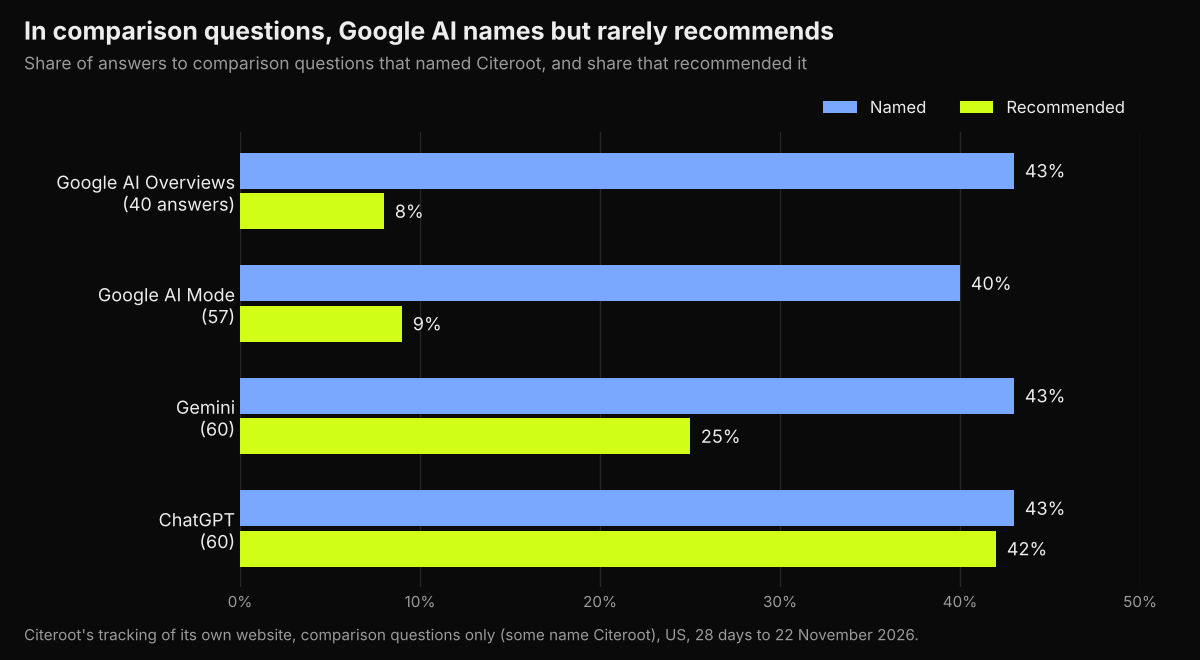
Read these figures with care. They describe one brand in one market, the comparison samples are small (40 to 60 answers per platform), and some of those questions name Citeroot. The pattern still makes the practical point: on Google's AI, a mention count overstates how often you are being recommended, so track the two separately. On problem, shortlist and constraint questions, none of the four platforms named Citeroot at all.
The answers to this very question send readers to Google first. Citeroot has collected 133 answers to "how to track recommendations in google generative search" from ChatGPT, Gemini, Google AI Overviews and AI Mode in the US; the most cited sites were support.google.com (54 answers), developers.google.com (48) and youtube.com (27).
#Which tools track Google's AI answers?
Search Console is free and should be your starting point for impressions. For the answers, recommendations and competitors, you need a tracker that checks AI Overviews and AI Mode directly. Of the tools in our AI visibility tool pricing guide, checked on 22 November 2026, Citeroot includes both on every plan, Ahrefs and SE Ranking list both, Otterly.AI and Peec AI include them if you choose them as one of your engines, and HubSpot AEO does not list them.
Before you buy, ask each tool two questions: does it record recommendations separately from mentions, and does it cover Gemini as well as AI Overviews and AI Mode? Our data shows those three surfaces behave differently.
#Common mistakes
- Reading Search Console impressions as recommendations. An impression means your page appeared, not that the answer chose you.
- Counting mentions as recommendations. In our comparison data, Google AI Overviews named Citeroot five times as often as it recommended it.
- Checking only AI Overviews. AI Mode and Gemini answer differently and need their own checks.
- Searching while signed in. Your own history can change what you see; use a private window.
- Ignoring location. For local businesses, check from the area your customers search in.
#Where Citeroot fits
Citeroot asks your buyer questions on Google AI Overviews, Google AI Mode, Gemini and ChatGPT on a fixed schedule and stores every answer with its supporting links. It records mentions, links and recommendations separately, splits them by platform and buyer stage, and shows who was recommended instead, which is how the figures above were made. It fills the gap Search Console leaves: what the answers actually say. See the Answer Tracker.
#Frequently asked questions
#Does Search Console show clicks from AI Overviews?
Not separately. The generative AI report counts impressions, and clicks from AI features are counted inside the ordinary Web search figures of the main Performance report.
#Can I stop my site appearing in AI Overviews?
Yes. Search Console added a control in 2026 that lets a site opt out of Google's generative AI features in Search. Opting out also removes your pages as supporting links, so weigh the lost visibility before you use it.
#Does Gemini cite the same sites as AI Overviews?
No. In 90 days of data across 10 markets, Gemini gave 92.4% of its citations to editorial pages, while AI Overviews gave 75.5% and cited youtube.com in 53.7% of answers with sources. Our guide to getting cited by AI assistants shows the full split.
#How often should I check Google's AI answers?
Monthly by hand is enough for a baseline. Weekly or daily tracking helps once you are changing pages and want to see what moved, read over several weeks.
#Is a supporting link a recommendation?
No. A supporting link means Google's AI used your page as a source; the answer may still recommend a competitor. Count links and recommendations separately.
#Next step
Open Search Console's generative AI report to see which of your pages appear, then check ten buyer questions in AI Overviews, AI Mode and Gemini and log who is recommended. Citeroot's free plan checks five questions every week on all three Google surfaces and ChatGPT, and our guide to optimising for Google AI Overviews covers what to change.
#Sources
- Google Search Central Blog, Introducing Search Generative AI performance reports in Search Console, 3 June 2026.
- Google Search Central, AI features and your website, read 22 November 2026.
- Carolyn Shelby, Search Engine Journal, Google Now Reports AI Search Impressions. Here's How To Read Them, 4 August 2026.
- Search Engine Land, Google Search Console AI performance reports and Search generative AI control rolling out globally, 2026.
- Citeroot answer data: 2,257 answers about Citeroot's own market on four platforms (US, 28 days to 22 November 2026), 4,527 answers across 10 markets (90 days to 22 November 2026) and 133 answers to one tracked question (US).